

Record a track
Start, pause, and save a recording, or use the controls on Apple Watch.
A track records where you went. Switch to Record in the bottom bar, then tap the record button. Allow location access if asked. Recording continues with the screen off. If location access is turned off during a recording, Glassing keeps the track and tells you location is off.
Read the recording panel
The panel above the bar shows distance, time, elevation, and location accuracy. Drag it upward to see more detail.
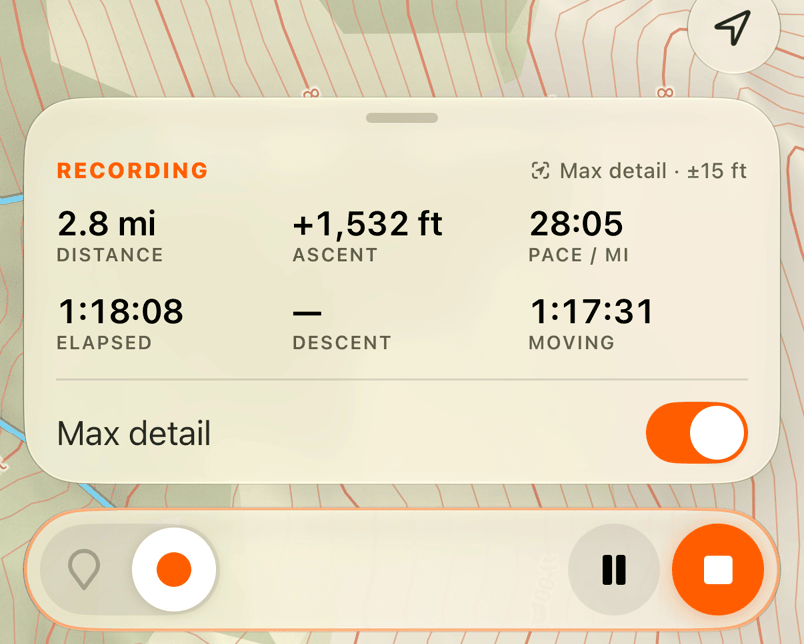
- Acquiring means the phone is waiting for a position.
- Recording means the track is running.
- Break means you have stopped moving. The clock keeps running, and recording picks up when you move.
- Paused means the clock and track are paused. Resume when you are ready.
- Stopped means the recording is ready to save.
Max detail keeps location sampling active even when you stand still. It uses more battery. Leave it off for normal recording.
Pause or finish
Tap pause to stop the clock without finishing the track. Resuming starts a new segment, so the map does not draw a line across the pause. Glassing can also pause when it detects driving.
Tap stop to open the save form. Add a name or notes, check File under, and tap Save. Continue recording returns to the same track with your edits intact.
A saved track also goes to Apple Health as a hiking workout when Health access is allowed. Its panel then says "In Apple Health" under Walked, and Settings › About has an Apple Health row that opens the Health app.
Switch tools while recording
You can inspect the map or follow a route while recording. Switching tools does not stop the track. Ending navigation and stopping recording are separate actions.
To plan a line before you go, see Draw and edit a route.
Recover an interrupted recording
Glassing saves the recording as it goes. After a relaunch, a recent interrupted track returns paused. Older recordings are finished and saved at their last position. Resuming a pause more than an hour old saves that track instead of continuing it.
Use Apple Watch
Keep your phone with you. The watch depends on the phone for location and recording; it does not record a separate track.
Swipe between the map and recording panes. The recording pane shows distance, moving time, and elevation. Its main button starts, pauses, or resumes. Ending from the watch asks for confirmation and saves the track.
The watch map is a picture sent by the phone. A stale label means it is old or you have moved outside its area. Turn the crown to zoom. Tap the waypoint button to save the phone's location, then choose a symbol.
If the phone does not answer, check the recording state on the phone before relying on the watch's last reading.
Need help? Email support.